Showing posts with label Tutorials. Show all posts

Saturday, October 16, 2010

Create your own World

An article that I find great, has appeared in HardyDev. Derrick Freehand an ags forum member, being on the working of his game Collision, has written an article about how one should create his game world. It mostly scratches the surface, but that doesn't mean it doesn't have valid information. I feel its really worth checking out. Here's the topic of Collision and here's a link for the article.

Also on a side-note the first MAGS under the hosting of Atelier is over. See the results, here.

Friday, April 23, 2010

Make an adventure in a day

Hardydev has a nice long tutorial about making games with AGS. What are you still doing here? Head on over and read...

Monday, March 8, 2010

Lets do the time lapse again

Steve McCrea, he of innovation award winning, presents a time-lapse video of creating an AGS game in an hour, in 6 and a half minutes!

Monday, December 14, 2009

Perk up

Ben Chandler has some tips over at hardydev on how to get through the "Slough of Despond" (and presumably on into the Staines of Joy instead) on a game project.

Wednesday, May 27, 2009

Dogular Mialog

or Modular Dialog... anyway, densming has posted another excellent AGS video tutorial:

Tuesday, May 12, 2009

The Gabriel Knight has a thousand eyes...

...and a thousand eyes can't help but see that densming has stuck some more awesome tutorials on the tube that is yours. This time, its a couple about making Gabriel Knight-style dialogues.

Monday, March 23, 2009

Use X on Y

Well, its something that many people have trouble with (perhaps the most common question in the Beginners Tech forum), so densming has once again demystified AGS this time particularly using inventory items on an object.

Friday, March 20, 2009

Skippy the cutscene kangaroo

densming's put up another video tutorial tying up some loose ends on cutscenes (e.g. how to skip them!)

Wednesday, March 11, 2009

Putting things into perspective

Perspective tutorial animation
Over in the forums' Critics Lounge, SpacePirateCaine has posted this very good little animation on how to do single-point perspective (which so many newbies get wrong). Thanks, ye scurvy sea dog!

Tuesday, March 10, 2009

Video Tutorial update

And densming's excellent series of video tutorials continues:

More on custom animations:


Putting a cutscene together:

Friday, February 27, 2009

Creating a New Room template

One thing I find annoying is adding in the same interactions and scripts to a new room over and over again, but things don't need to be that painful with room templates. So here's a quick tutorial on how to do it:
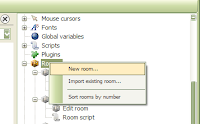
First, create a new room to build your template in, or if you have a room you'd already like to use as one, just go to it and skip the next few steps. Bear in mind, however, that everything about the room will be used as a template including any backgrounds, objects, etc. you've got set up.
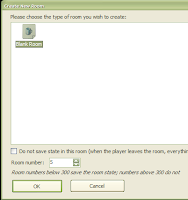

Choose the empty room template and create the room.
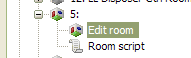

Expand the new room in the project tree pane and select Edit Room.
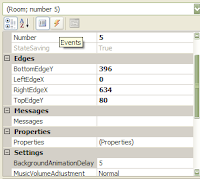

Then, I want to set up the basic, common, interactions for this template as I use them in most rooms. If I don't need them, I can just leave the script functions empty. So, go to the events pane...
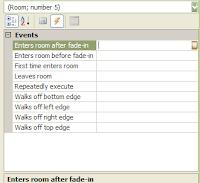

And click on the ellipsis icon at the end of each row you want an interaction for.
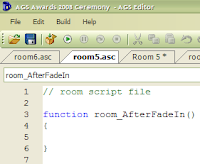


This creates a blank function in the room script. Then click back to the room and the interaction pane and do the next one...
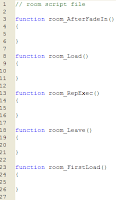

Until all the script functions you might want are created
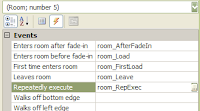

And all the interactions you might want are set up in the room editing screen
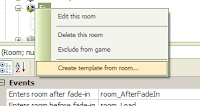

Then, right-click the room in the project tree, and select "Create Template from this Room".
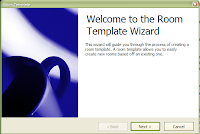

The template wizard pops up, hit Next.
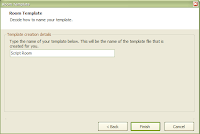

Enter the template name you want it to have (there seems to be a character limit on this name) and hit Finish.
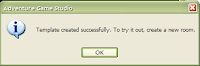

A confirmation dialogue pops up.
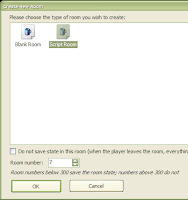

Then you can create a new room and select your new template (or use the standard empty room still for some rooms if you wish, or create more different templates) and you'll find your new rooms have all these steps already done for you!

So, give this template creation thing a try and save yourself some time and frustration!

Monday, January 26, 2009

Getting animated on youtube

Densming's excellent series of video tutorials for AGS has continued with some lovely gems on animation and sound:


Monday, November 24, 2008

Youtube is alive with sounds and music...


What do you do about a problem like Media? Well, coming to your aid(elweiss) is the latest in the series of AGS tutorial videos by densming. Fab stuff, that makes it as easy as Do Re Mi.

Thursday, November 6, 2008

Teen tutorial


Well, if you recall the video tutorials I mentioned a while ago (and I didn't recall them, thanks to IndieBoy for reminding me) you'll be pleased to hear that no less than the 19th one is out, and covers Text Overlays. densming is doing a great thing here, so a big thanks to him for creating this resource.

Monday, October 20, 2008

The Light Fantastic


Well, Ben has another wee graphics tutorial up on his blog, giving some info on how one can do reflective highlights of the surrounding environment.

Tuesday, October 7, 2008